
Keeping your phone and keyboard clean is essential not only for hygiene but also for device longevity. These gadgets are used daily and can collect dust, oils, and germs. However, cleaning them incorrectly can cause damage. This guide will walk you through safe and effective steps to clean your phone and keyboard properly.
Why Clean Your Phone and Keyboard?
Phones and keyboards are some of the most frequently touched surfaces in our environment. They can harbor bacteria, dirt, and grime, which may affect your health or device performance. Regular cleaning can:
– Remove germs and bacteria
– Improve device responsiveness
– Prevent buildup of dust and debris
– Maintain the overall appearance of your device
What You Need Before You Start
Gather these items to ensure a safe cleaning process:
– Microfiber cloths (soft, lint-free)
– Distilled water
– Isopropyl alcohol (70% or less)
– Cotton swabs or soft brushes
– Mild soap (optional for keyboards)
– Compressed air canister (for keyboards)
Avoid harsh chemicals, abrasive tools, or excessive moisture as they can damage screens or internal components.
How to Clean Your Phone Safely
Your phone is delicate, especially the screen and charging ports. Follow these steps for a thorough clean:
1. Power Off Your Phone
Always turn off your device before cleaning. This reduces the risk of short circuits or accidental inputs.
2. Remove Phone Case and Accessories
Take off the case, screen protectors, and any other accessories to clean them separately.
3. Prepare a Cleaning Solution
Mix equal parts distilled water and isopropyl alcohol (70% or less). This combination disinfects without harming the screen coating.
4. Wipe the Screen and Body
Dampen a microfiber cloth with the solution—do not soak it. Gently wipe the screen and device surface to remove fingerprints, oils, and dirt.
5. Clean the Ports and Buttons
Use cotton swabs lightly moistened with the cleaning solution to clean around charging ports, headphone jacks, and buttons. Avoid putting liquid directly into openings.
6. Dry Thoroughly
Use a dry microfiber cloth to remove any excess moisture. Allow the phone to air dry fully before powering it back on.
7. Clean Phone Case and Accessories
Wash silicone or plastic cases with mild soap and water, rinse well, and dry completely. Avoid soaking leather cases.
How to Clean Your Keyboard Without Damage
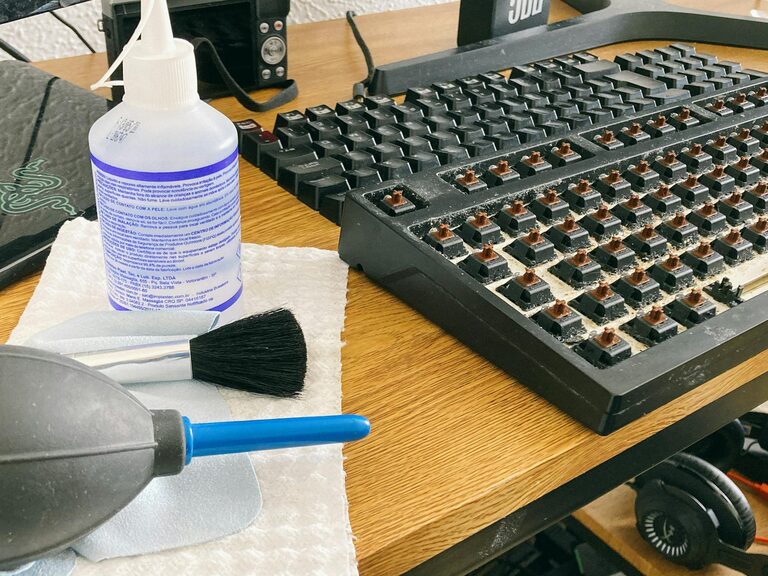
Keyboards, whether mechanical or membrane, collect crumbs, dust, and oils from hands. Here’s how to clean yours gently:
1. Unplug or Power Off Your Keyboard
Disconnect the keyboard or turn it off if wireless.
2. Remove Loose Debris
Turn the keyboard upside down and gently shake it to dislodge crumbs and dust. You can also use a compressed air canister to blow out particles from between keys.
3. Clean the Surface and Keys
Dampen a microfiber cloth with a mixture of distilled water and isopropyl alcohol (equal parts). Wipe the top surfaces of keys and keyboard body. Avoid letting liquid drip between keys.
4. Clean Between Keys
Use cotton swabs or a soft brush dipped lightly in the cleaning solution to clean edges and tight spaces.
5. Deep Cleaning (Optional)
If your keyboard allows, carefully remove keycaps and wash them separately with mild soap and water. Ensure keys are completely dry before reattaching.
6. Dry Completely Before Use
Allow the keyboard to air dry fully, especially if you performed deep cleaning.
Tips for Maintaining Clean Devices
– Wash your hands before using your devices
– Avoid eating over your keyboard or phone
– Clean your devices regularly to prevent buildup
– Use screen protectors and keyboard covers to reduce grime
– Store devices in clean, dust-free areas when not in use
What to Avoid When Cleaning Electronics
– Don’t use bleach, ammonia, or window cleaners
– Never spray liquid directly onto devices
– Avoid excessive moisture
– Don’t use abrasive cloths or paper towels that can scratch surfaces
– Avoid harsh scrubbing on screens or key surfaces
Conclusion
Cleaning your phone and keyboard regularly using safe methods helps maintain hygiene, improves functionality, and extends the lifespan of your devices. By following the steps outlined above, you can confidently clean your gadgets without worry of damage. Set a cleaning schedule that fits your lifestyle, and enjoy fresh, clean devices every day!